Product Update
Wellness Hub updated to version 10.30.03.00.95 (changes since 0.93).
Hubs will automatically download and update.
New Features:
- Video Calling / Start call as audio only
Updates:
- Channels: new click-through for the Engagement Bundle services
- New "Visit" reminder type
- Expanded "Task" categories & icons
- Optional Smart Home & Biometric provider-level feature enablement (requires Support request at this time to change the default; currently always enabled)
New Features
Video Calling / Start Call as Audio Only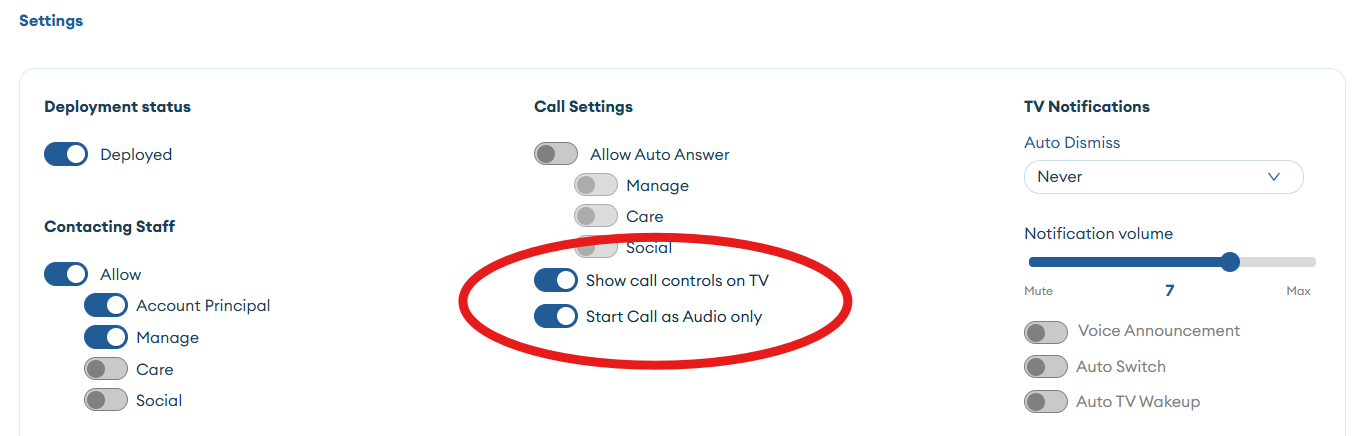
- If enabled via the Care Portal (Account Profile/Settings), when a video call is started on the Wellness Hub the camera will be muted and so any web/mobile participants will not see the video from the Wellness Hub.
- This applies to both regular Video Calls and Zoom Meetings
- If the "show video controls" is enabled via the Care Portal (Account Profile/Settings), then the client will have the ability via the remote control to toggle their video on / off.
- If "show video call controls" is disabled then the client will not be able to enable camera video for the current call
Updates
Channels
- A new click-through terms of service has been added for the content services from our partner, Engagement Bundle. This includes:
- Discover Live
- Memory Lane TV
- Spiro100
- Stage Access
- Zinnia TV
- Accepting the terms once will make all of these services, where enabled for an account, available. If the terms are updated in the future an additional acceptance will be required.
- Additional status and error messages have been added for situations when the content isn't playable or the content catalog is still loading after the Wellness Hub is powered on. This process can take about 2 minutes, so there's no need to reboot—just try again after a short wait.
Visit Reminder Type
- A new reminder type, "Visit" can now be selected in addition to the existing "Calendar Reminder"
- This will display a new icon / visual cue in the reminders on-screen on the Wellness Hub to differentiate from other tasks and reminders.
- In future roadmap additional capability related to visits may be implemented.
Expanded Task Categories
- Additional task categories / icons can be selected now when adding tasks via the Care Portal and Mobile app. These new icons will be displayed on the Wellness Hub.
Smart Home & Biometric Feature Enablement
- NOTE: If the provider is configured (currently via support request) to DISABLE the Smart Home or Biometric features, please note that the Wellness Hub will still allow these accessory devices to be paired but the Care Portal and Mobile app will not display these features or data.
- The data is stored with the Account however, so if the features are later enabled then the data history will be available.
- This feature control is currently at the provider level (impacts all Accounts). Future roadmap is to provide account level control.